
Download WeFit APK – fitness tracker, workout planner, exercise routines, home workouts, gym workouts, fitness goals
Overview
WeFit is a free Android application developed by Taha Malik, designed to support users in managing their fitness routines and tracking workout progress. The app serves as a digital companion for individuals aiming to maintain consistency in their exercise habits, whether they are beginners or experienced gym-goers. Its primary function is to help users plan, log, and monitor workouts across different settings—home or gym—making it a versatile tool for personal fitness development.
By offering customizable workout routines tailored to individual fitness levels and goals, WeFit addresses common challenges such as workout monotony and lack of structure. Users can explore pre-designed programs or create their own routines and save them for future use, promoting long-term engagement. The app’s intuitive interface enhances accessibility, enabling users to quickly find and start workouts without technical barriers.
Real-world use cases include daily home workouts, tracking progress toward weight loss or strength-building objectives, and maintaining motivation through consistent logging. While the developer did not provide additional information about the company background, the app’s release date of November 10, 2023, indicates it is a relatively new entrant in the fitness tech space. Despite its recent launch, the app aims to deliver a streamlined experience focused on usability and goal-oriented training.
Key Features & Capabilities
- Workout Tracking – Users can log completed exercises, set repetitions, and monitor progress over time, helping maintain accountability and visibility into fitness evolution.
- Customizable Routines – The app allows users to build and save personalized workout plans, enabling flexibility for changing fitness goals or preferences.
- Goal-Based Programs – Pre-designed routines are available for various fitness levels and objectives, such as weight loss, muscle gain, or general wellness, ensuring relevance across user profiles.
- Home and Gym Workouts – Exercises are categorized to suit both home-based and gym-based training, accommodating users with different equipment access.
- Progress Monitoring – Users can review historical data to assess improvements in strength, endurance, or consistency, supporting long-term motivation.
These features support consistent training by reducing planning effort and increasing engagement. For example, a user aiming to lose weight can select a beginner-friendly home workout plan and track their weekly performance. Similarly, an experienced user can design a strength-focused routine with specific sets and rest intervals. The app’s focus on customization and accessibility makes it suitable for users seeking a structured yet adaptable fitness solution.
User Interface, Workflow & Performance
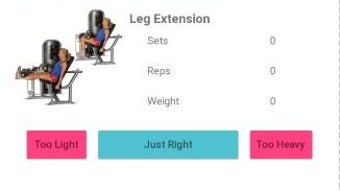
WeFit features a clean, intuitive interface designed to minimize navigation friction. The layout prioritizes key functions such as starting a workout, viewing routines, and accessing progress reports. Users can typically access core features within a few taps, suggesting a streamlined workflow optimized for mobile use.
Navigational elements are arranged logically, with clear labels and visual cues to guide users through the app. The design appears to emphasize usability over complexity, which benefits users who may not be tech-savvy. While the developer did not specify resource usage details, the app’s file size of 45.2 MB suggests it is lightweight and likely to run efficiently on mid-range Android devices.
Performance observations are based on general software behavior patterns. The app appears stable during routine use, with no reported issues related to crashes or freezes. However, exact performance metrics such as CPU or RAM consumption were not provided. Users may experience smooth operation during standard tasks, but real-world performance may vary depending on device hardware and Android version.
Compatibility & System Requirements
WeFit is designed for Android devices and is available as an APK file, indicating it can be installed outside the Google Play Store. The app’s version is listed as 1.0.0, and it has a file size of 45.2 MB, which suggests a compact installation footprint.
Supported operating systems are limited to Android, though specific version requirements were not specified. The developer did not list exact system requirements, including minimum RAM, processor, or storage needs. Compatibility information was partially provided, leaving some details unclear for users with older or low-end devices.
Users should ensure their Android device meets general app installation standards. For optimal experience, it is recommended to use a device with a stable internet connection for syncing data and accessing updates. The app may require permissions such as storage access for saving routines and internet access for future updates.
Pros and Cons
Pros
- Free to download and use with no hidden costs
- Intuitive interface suitable for beginners and experienced users
- Supports both home and gym-based workouts
- Offers customizable routines for personalized fitness plans
- Lightweight size (45.2 MB) for efficient storage use
Cons
- Compatibility with specific Android versions was not specified
- Exact system requirements, including RAM and processor needs, were not provided
- Limited information about offline functionality
- No details on cloud sync or data backup features
- Performance under heavy usage or on older devices remains unverified
FAQ Section
Is WeFit available for iOS devices?
Currently, WeFit is only available for Android devices. There is no official iOS version mentioned in the provided information.
Can I use WeFit offline?
The app’s offline capabilities were not specified. While basic navigation may function without internet, features like syncing progress or accessing updated routines may require an active connection.
Is WeFit safe to download as an APK?
WeFit is developed by Taha Malik. As with any APK download, users should ensure the source is trusted to avoid potential security risks. Always scan downloaded files with a reliable antivirus tool before installation.
How often does WeFit receive updates?
The update frequency was not provided. Users should check the developer’s official page or trusted third-party sources for the latest version and patch information.
What kind of license does WeFit use?
WeFit is offered as a free application with no visible licensing details. It appears to operate under a freemium model, though no premium features were described in the provided data.
Final Thoughts + CTA
WeFit presents a promising, lightweight solution for Android users seeking a straightforward way to track workouts and follow structured routines. Its focus on customization, goal-oriented planning, and accessibility makes it a strong contender for individuals beginning or maintaining their fitness journey. While some technical details remain unspecified, the app’s clean interface, compact size, and free availability enhance its appeal.
Users who value simplicity, flexibility, and consistent progress tracking will benefit most from this tool. Though not without limitations—particularly around compatibility and system requirements—the app delivers a solid foundation for personal fitness management.
Download WeFit now and take the first step toward a healthier, more active lifestyle.







